A team, not a chatbot
Each role is its own agent with its own model, instructions and permissions. A deterministic state machine calls one role at a time, and every answer is a typed schema.
Write what you want built. A Product Owner turns it into a backlog, an Architect into a plan, specialists build it phase by phase, QA writes the tests and DevOps opens the pull request. Nothing moves past a gate until a person says yes.
$ docker run -d --name slipwright -p 8500:8500 \
    -v slipwright-state:/data -v slipwright-work:/work \
    ghcr.io/ksksertac/slipwright:latest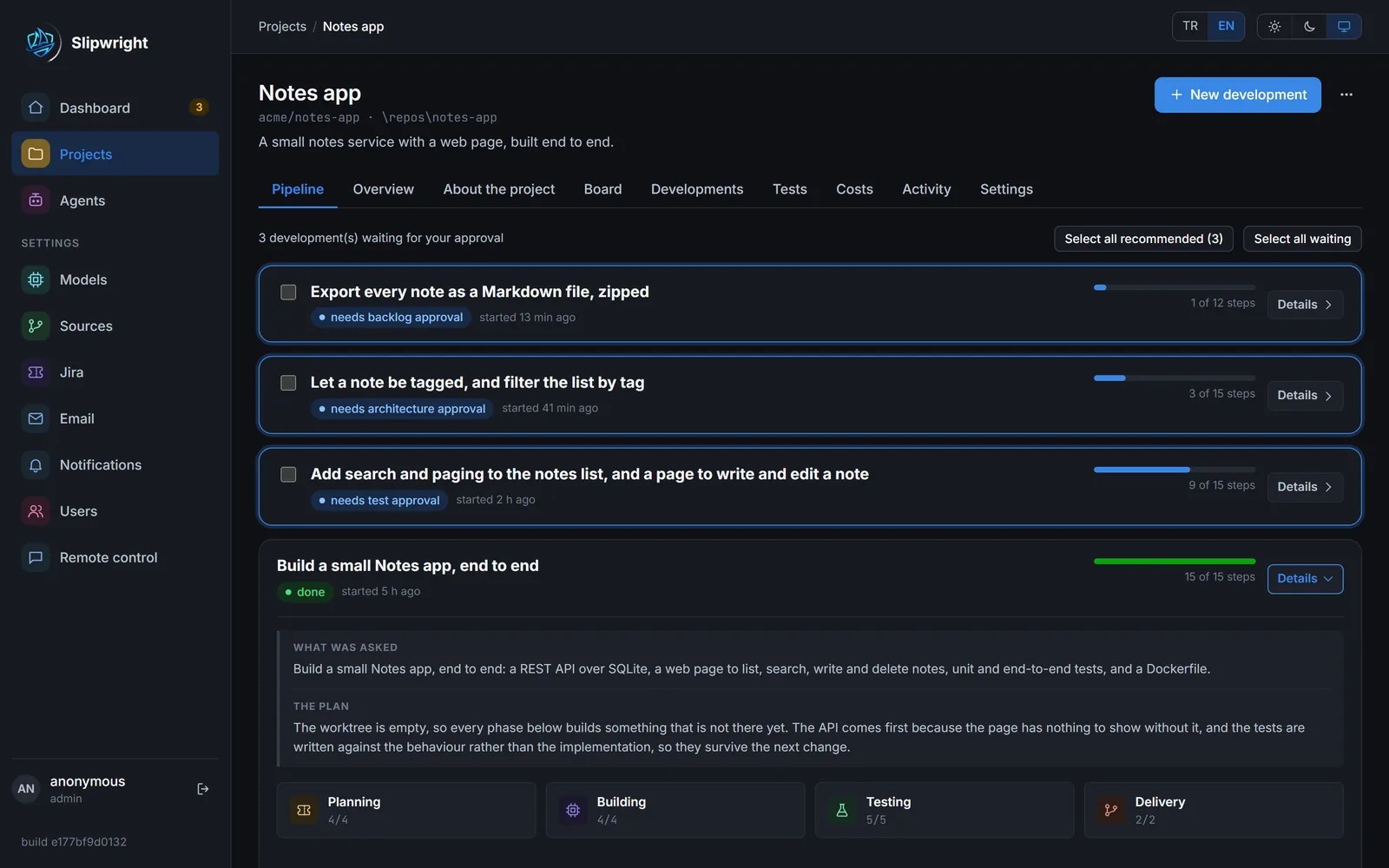
Most coding agents are one model in a loop, and you find out what it did when it is finished. Slipwright keeps a person at the wheel from request to pull request.
Each role is its own agent with its own model, instructions and permissions. A deterministic state machine calls one role at a time, and every answer is a typed schema.
Backlog, architecture, screens, test cases, tests and deployment each stop at a gate. Edit what was proposed, approve it, or send it back with a reason.
Every step is written to the database before the next one runs. Stop the server mid-development and start it again: running work carries on, waiting work keeps waiting.
It runs on your own model keys, pushes to your own GitHub or Bitbucket, and mirrors the backlog into your own Jira.
Every stage stops at a gate you control. The agents never talk to each other; the engine hands work from one role to the next.
Describe what you want in plain words: in the pipeline, from the CLI or from Telegram.
Epics, stories and tasks, written after reading the request and the repository. Rename, add or remove anything before approving.
The stack, the build/test/run commands, the decisions and one phase per task. Reorder phases, change domains, files or commands.
Backend, web and mobile developers do the work, with the Designer's screens ready before any UI phase. After every phase the build gate runs your build_cmd and test_cmd; a red build goes back to the same specialist (up to three times), and QA reviews the diff against your standards.
Approve the test cases, then the unit and end-to-end tests written against exactly those cases. Or go on without tests.
Deployment files, the pushed branch and a pull request described from the plan, test cases and history. CI is watched; red CI goes back to the developer who wrote the code.
The pull request link is on the development and in the activity feed. Review it like any other PR.
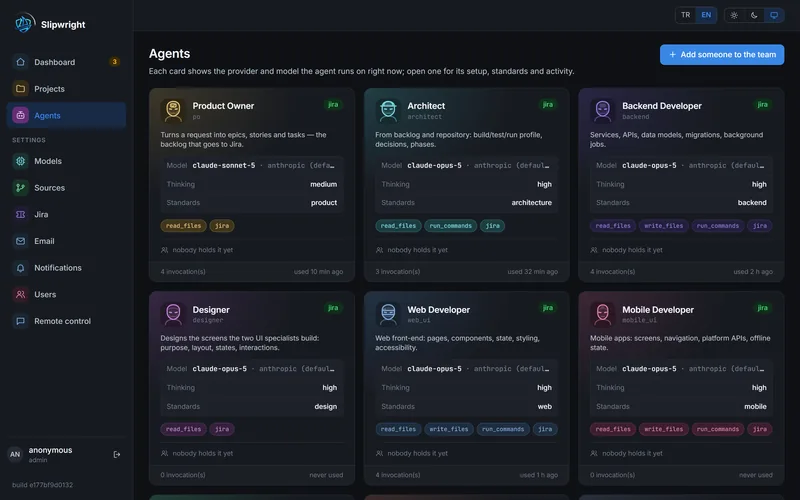
Each agent has its own provider, model, thinking depth, standards and permissions, enforced by the engine, not by the prompt.
Reads the request and the repository, writes epics, stories and tasks.
Chooses the stack, the build/test/run commands, the decisions and one phase per task.
Draws the screens the web and mobile specialists will build, behind a gate of its own.
Implement one phase each, in the phase's own domain, behind the build gate.
Proposes test cases, then writes unit and end-to-end tests for the approved ones, and reviews every diff against your standards.
Proposes the deployment, writes it, pushes the branch and opens the pull request.
Reads every gate and recommends approve or reject, with confidence, risk and reasons.
Put a colleague on an agent: they approve and edit only at that agent's gates, and are mailed when work arrives.
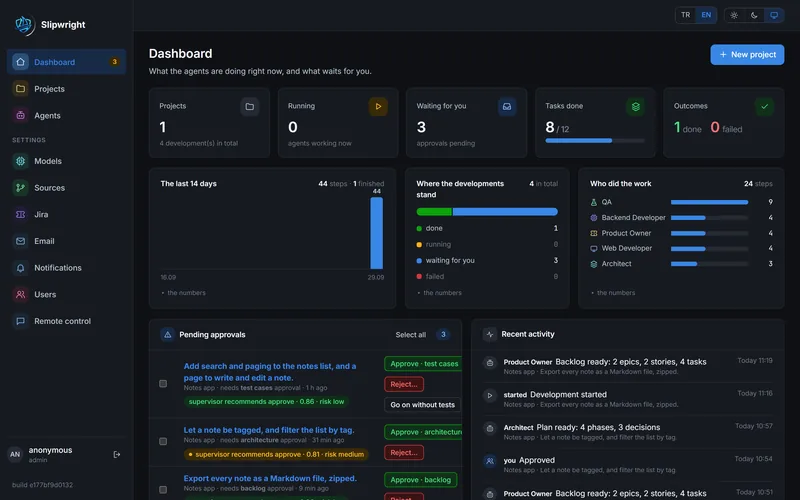
Gates you can edit, a pipeline for every development and a dashboard of what waits for you.
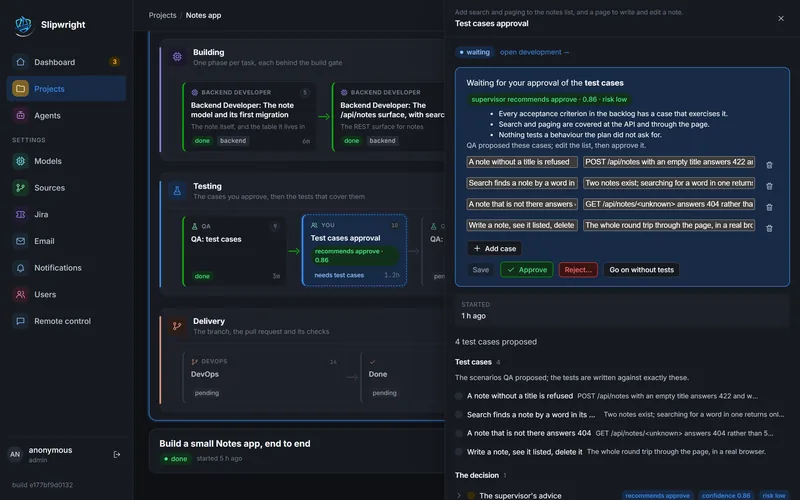
Each gate offers Save, Approve and Reject with a reason, and the reason goes back to the agent as feedback.
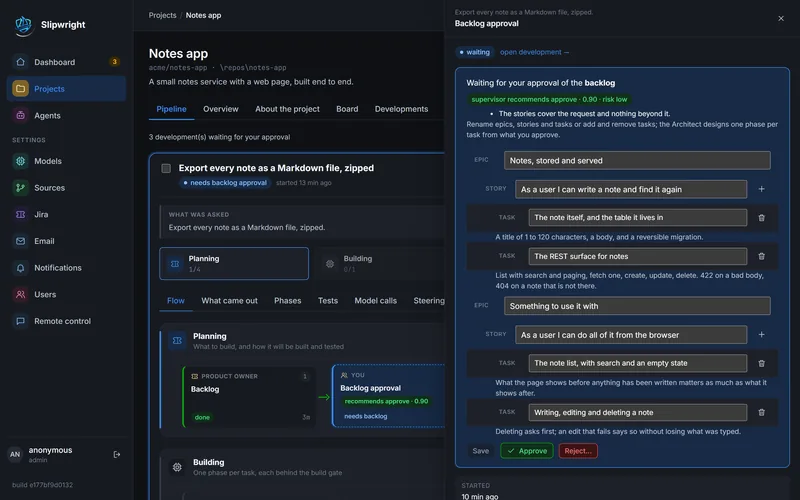
Rename epics, stories and tasks, add or remove tasks. The Architect designs one phase per task from exactly what you approve.
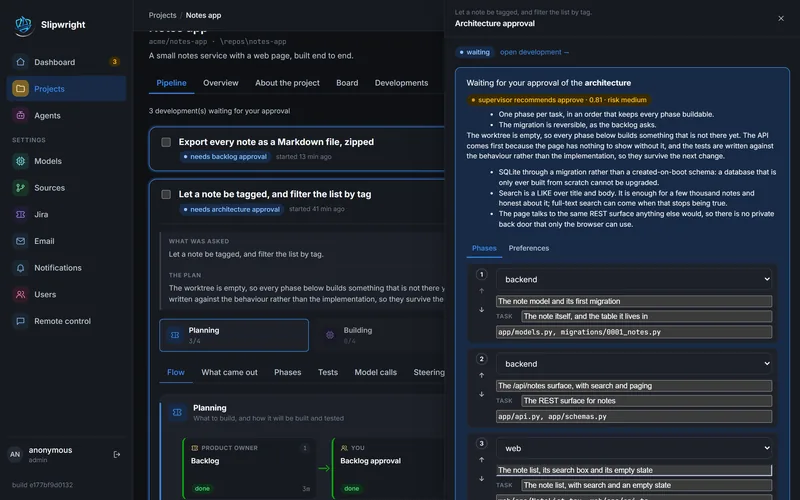
Read the decisions, reorder phases, change a phase's domain or its files, and adjust the build, test and run commands.
Running agents, approvals pending across every project (answerable right there), developments by state and a live activity feed.
Each card shows which provider and model the agent runs on right now, how deeply it thinks, which standards it reads and what it is allowed to do.
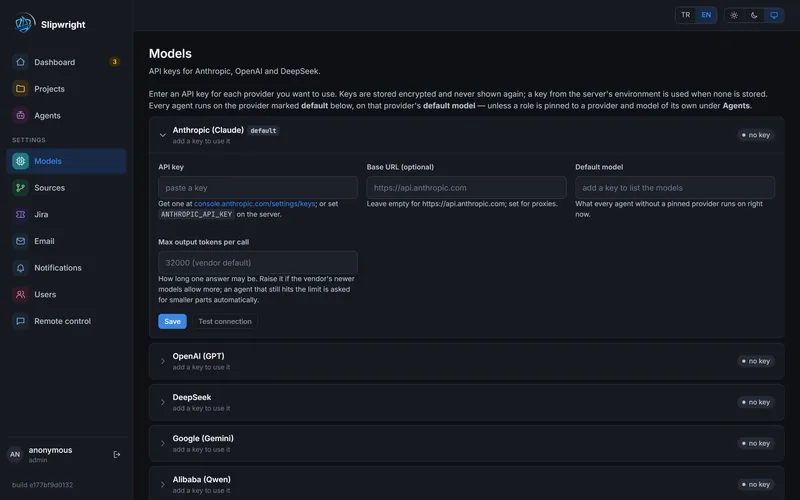
A strong model for the Architect and a cheap one for DevOps. Keys are stored encrypted, and Test connection tells you which models each key can use.
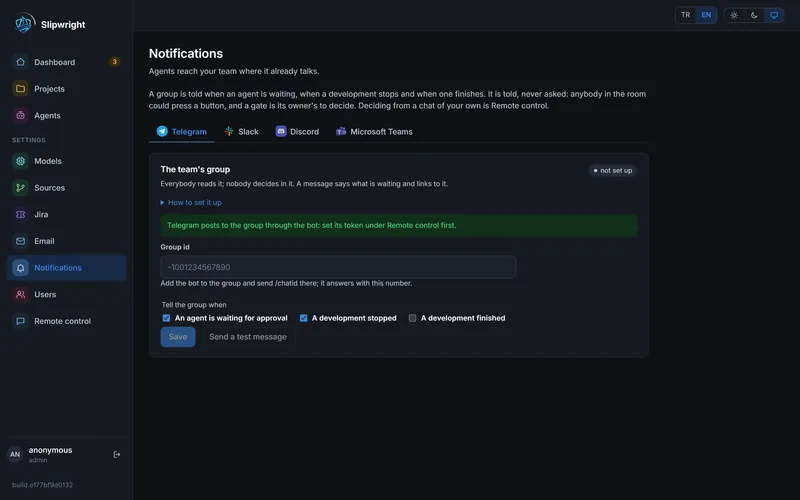
Group notifications in Telegram, Slack, Discord or Microsoft Teams: told when an agent is waiting, when a development stops and when one finishes.
Per project, choose how much the supervisor does. When a build fails, it also decides whether the same specialist fixes it, whether to re-plan, or whether to ask a person.
After every phase, the project's own build and test commands run. Every green phase is committed on the development's branch. Then QA reviews the diff against your standards: Markdown pages per domain, indexed for keyword and optional embedding search.
# the project's own commands, after every phase
$ uv run pytest -q
........................  24 passed in 3.1s
$ npm run build
✓ built in 2.4s
# green → committed on sw/notes-search
# QA review against standards/backend.md
review: advisory · 0 blocking findingsPin each agent to its own provider and model. Change the model in the profile and that role runs on it. No code change, no restart.
"architect": { "model": "claude-opus-5",
               "thinking_depth": "high" },
"qa":        { "model": "claude-sonnet-5",
               "thinking_depth": "medium" },
"devops":    { "model": "claude-haiku-4-5",
               "thinking_depth": "low",
"permissions": ["git_push", …] }Clone a private repository or use a local checkout. A finished development pushes its branch and opens a pull request; red CI goes back to the developer.
The approved backlog becomes epics, stories and sub-tasks. PR links and failures are commented, as a bot account you choose.
The interface is in English and Turkish. Agents write in the project's language; everything is shown in yours through a cached translation bridge.
Per-project budgets on tokens, wall-clock time and model calls stop a runaway development with a readable reason.
Start, approve, reject and message developments from the command line. A JSON API at /docs and server-sent events for every change.
Model keys and tokens are stored encrypted. State and work live in separate volumes, so a checkout can never reach the key.
| Local | Hosted | |
|---|---|---|
| Who writes the build commands | you | strangers |
| Database | SQLite file | PostgreSQL |
| Commands run | on the machine | in a throwaway container |
| Model keys | the installation's | each account's own |
| Quotas | off | on |
One image holds everything: the API, the web UI, git, gh, Python and Node. There is no separate database or queue to run.
docker run -d --name slipwright -p 8500:8500 \
    -v slipwright-state:/data -v slipwright-work:/work \
    ghcr.io/ksksertac/slipwright:latest
# first login (becomes admin)
docker exec -it slipwright slipwright user add ada
Open http://localhost:8500. Keep /data and /work as two separate volumes: /data holds the key that decrypts every stored credential.
git clone https://github.com/ksksertac/slipwright.git
cd slipwright
# optional: API keys, a stable SLIPWRIGHT_SECRET_KEY
cp .env.example .env
docker compose up --build -d
docker compose exec slipwright slipwright user add ada
Try it offline with SLIPWRIGHT_PROVIDER=scripted docker compose up. The whole pipeline runs on canned replies, no keys needed.
git clone https://github.com/ksksertac/slipwright.git
cd slipwright
uv sync
cd web && npm install && npm run build && cd ..
uv run slipwright user add ada
uv run slipwright serve
Serves on http://127.0.0.1:8500. The JSON API is documented at /docs.
Every push to main publishes :latest for amd64 and arm64; a v1.2.3 tag publishes :1.2.3 as well.
Slipwright is fully open source under the Apache 2.0 license. Read every line, run it anywhere, fork it, and help shape where it goes next.
Bug reports, fixes, new model providers, translations, documentation and ideas all help. Every contribution goes through a pull request on GitHub.
CLAUDE.md is the orientation: the layout, the rules that are easy to break and the mistakes already made.# fork on GitHub, then
git clone https://github.com/<you>/slipwright.git
cd slipwright && git checkout -b my-change
uv sync
# the whole suite, lint and types
uv run pytest
uv run ruff check . && uv run mypy
cd web && npm install && npm run lint && npm run build
# push and open a pull request
git push origin my-changeYes. Slipwright is open source under the Apache 2.0 license. You pay only for the model API calls your agents make, with your own keys.
Run the published Docker image with the command above, create the first login with docker exec -it slipwright slipwright user add <name>, and open http://localhost:8500. A “Getting set up” card on the dashboard walks you through the rest.
Anthropic Claude, OpenAI GPT, Google Gemini, DeepSeek, Alibaba Qwen, Z.ai GLM and MiniMax work out of the box, and each agent can be pinned to its own provider and model. On a self-run install, agents can also use a ChatGPT subscription through OpenAI's Codex CLI.
Slipwright runs on your machine or server. Code is sent only to the model providers you configure, and pushed only to your own GitHub or Bitbucket repository.
Yes. Set SLIPWRIGHT_PROVIDER=scripted to run the whole pipeline on canned model replies. A new account also starts with Example: a Notes app, a finished development to read before you run one of your own.
Nothing is lost. Every step is written to the database before the next one runs, so running work carries on and work waiting for you keeps waiting.
Yes. The full source is on GitHub under the Apache 2.0 license. Open an issue for bugs and ideas, or fork the repository and send a pull request.
Yes. Switch to PostgreSQL, run every command in a throwaway container with SLIPWRIGHT_RUNNER=docker, and turn on sign-up, per-account keys and quotas. None of it is on by default, so a local install stays a single command.

Self-hosted, open source and running on your own keys. One command to start.